For property managers with owners
Owner statements,
straight to Xero.
Close the month and Airflow builds each property's owner statement — income, minus commission, minus management fee, minus expenses — and pushes a draft remittance bill to that owner's contact in Xero, tagged to the right property. The owner sees it in a read-only portal and gets it by email. No spreadsheets. No copy-paste. No accounting tool can do this, because it never had your owners in the first place.

The end of the month is the worst part of managing for owners
If you run a hundred properties for a hundred owners, the bookings were the easy part. The hard part is the last week of every month: pulling each property's income, subtracting your commission and management fee, finding every expense, building a statement an owner will actually trust, then re-keying the whole thing into your accounting system as a bill so the owner gets paid.
Do that across a portfolio and it's days of spreadsheet work — and every manual step is a place to fat-finger a number, mistag a property, or email the wrong owner the wrong total. Accounting-sync tools don't help here: they post reservations to a ledger. They were never built to know who the owner is, what your split is, or that a receipt for a plumber belongs on this property's statement.
How it works: close the month, the rest is drafted for you
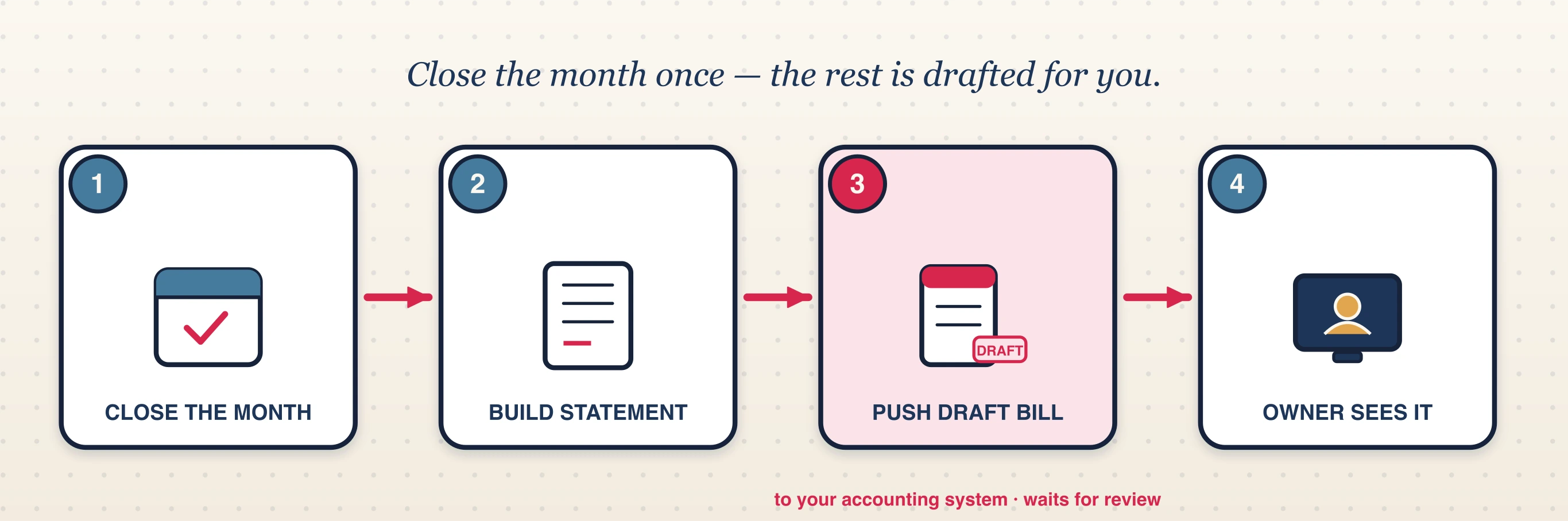
- 1
Close the month
Airflow already holds every booking, payout, commission rate and management fee per property — because it ran those bookings. Closing the month tells it to assemble the picture.
- 2
Airflow builds the per-property statement
For each property it works the maths: income − commission − management fee − expenses = net payable. Every line is itemised so the owner can see exactly where the number comes from.
- 3
It pushes a draft remittance bill to Xero
The net payable becomes a draft ACCPAY bill addressed to the owner's contact in Xero, tagged to that property's tracking category. It lands in your drafts for review — Airflow never approves, files or pays it for you. You stay in control of the books.
- 4
The owner sees it — portal and email
The owner views the statement in their own read-only portal and receives it automatically by email each month. No login chase, no "can you resend it," no arguments over the numbers.
What's on the statement
A clean, itemised picture per property — the same number that becomes the Xero draft.
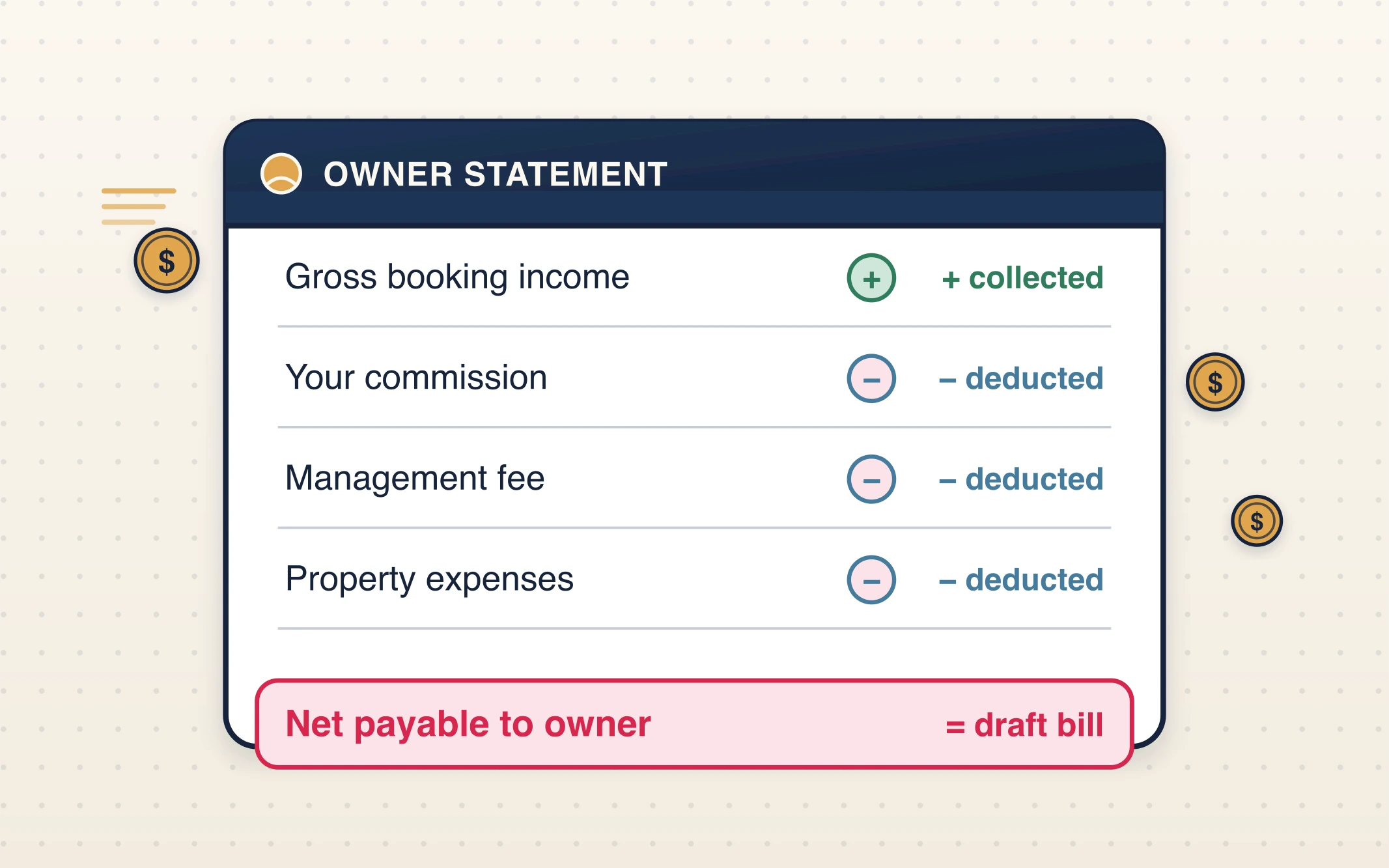
Tagged to the property's Xero tracking category, so your owner reporting and management-company books both stay clean.
Forward a receipt. It lands on the right owner's statement.
Expenses are where owner statements usually fall apart — a plumber's invoice in your inbox, a cleaning receipt
in a WhatsApp thread, a hardware-store slip in someone's pocket. Airflow gives every property its own expense
alias. Forward the receipt to the property's +expenses@ address and AI reads it, extracts the
amount and detail, and records it as an owner deduction against that property.
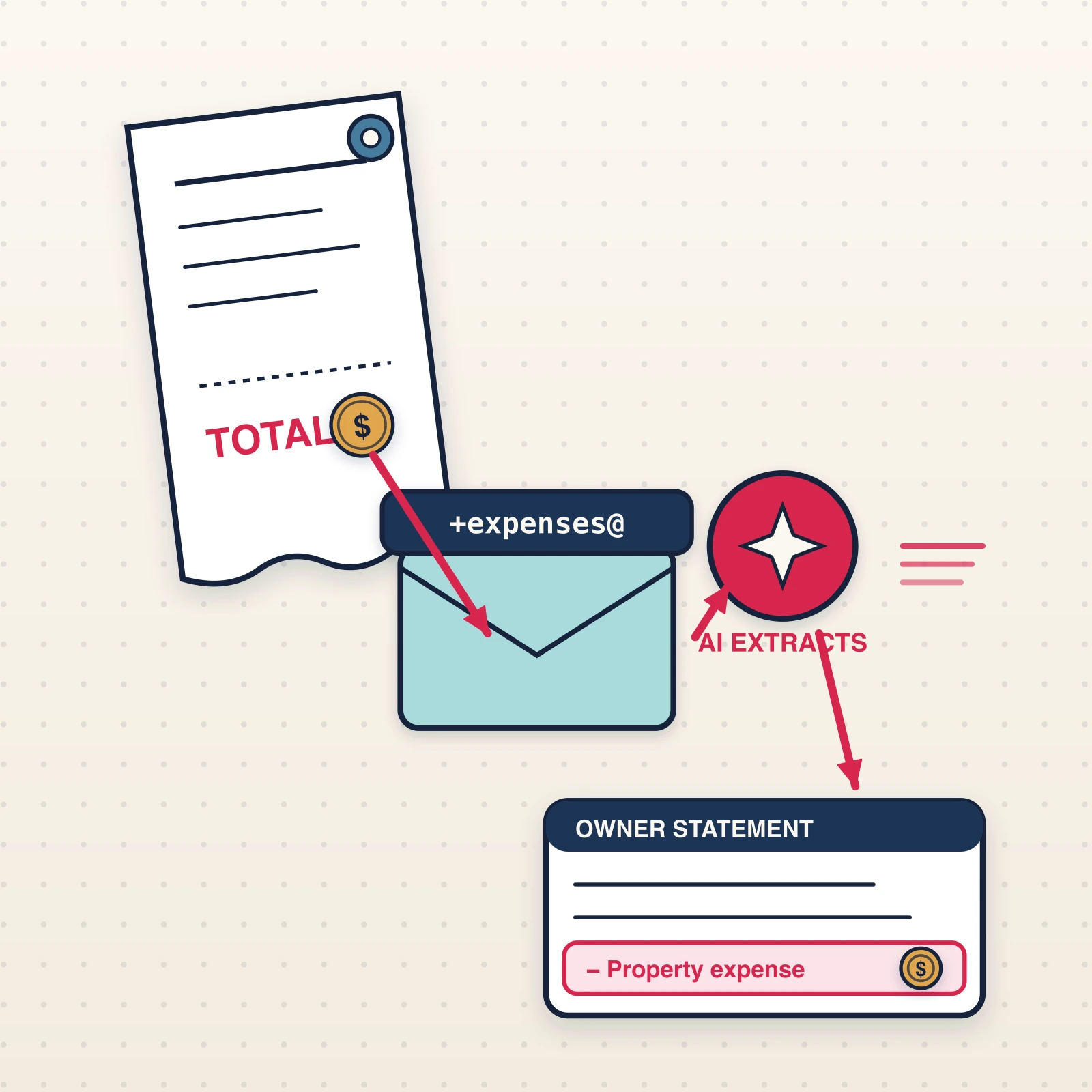
From there it flows into everything automatically: it appears as a line on that property's owner statement and is reflected in the net payable that becomes the Xero draft. The owner sees the deduction, with context, in their portal. You never open a spreadsheet to add it.
+expenses@ → AI extracts the detail → Owner deduction recorded → On the statement & the Xero draft Why a pure accounting tool can't do this
An accounting-sync tool starts at the ledger. It posts a reservation and stops. It doesn't know your owner, your split, or that a forwarded receipt belongs to this property — so it can't build a statement, and it certainly can't draft a remittance bill to a contact it's never met.
Airflow can do all of it because it ran the property end to end: the booking came in, the guest paid, the commission and fee are known, the expense was forwarded in. The owner statement isn't a new feature bolted on — it's the natural last step of a platform that already holds every piece. The books get synced. The owner gets paid. And you close the month in an afternoon instead of a week.
Common questions
Does Airflow file or pay the owner bill automatically?
No. Airflow pushes the remittance as a draft ACCPAY bill into Xero for your review. You approve, edit or pay it yourself. Nothing reaches an owner's account without you. The same applies to guest invoices — Airflow creates drafts; it never files or sends accounting documents on its own.
How does the statement reach the right Xero contact and property?
The bill is addressed to the owner's contact in Xero and tagged to that property's tracking category, so your per-property reporting stays clean and the owner's account is correct without manual matching.
What do owners actually see?
Each owner has a read-only portal showing their property's itemised statement, and they receive the statement automatically by email every month. They can see income, your commission and fee, and each expense — without access to anything else in your account.
How do expenses get onto the statement?
Forward any receipt to the property's +expenses@ alias. AI extracts the amount and detail and
records it as an owner deduction against that property, which then appears on the statement and in the net
payable that becomes the Xero draft.
Do I need to use Xero?
The draft remittance-bill push is built around Xero today. Airflow's broader accounting engine also supports QuickBooks Online (live, Intuit-approved), with FreshBooks and Sage built. If you'd like owner-bill drafting on another platform, tell us — it helps us prioritise.
Stop building owner statements by hand
Close the month once. Airflow drafts every owner's remittance bill in Xero for your review and emails each owner their statement. Nothing is filed without you.
Start with Airflow